By email or link
Everyone gets their own link, and on a paid plan it goes out by email too.
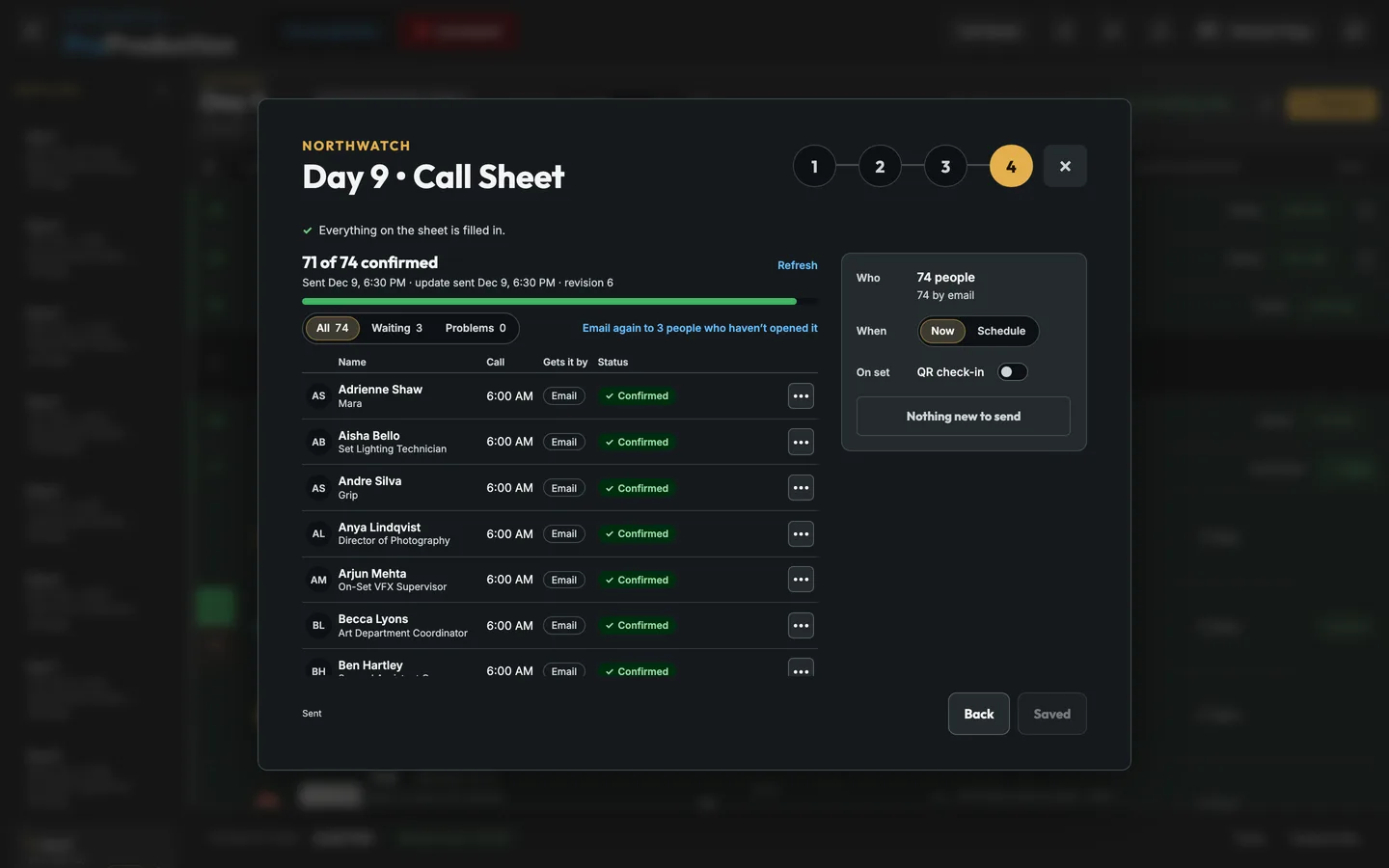
Each person gets their own part of the day: their call time, the scenes, where to go and park, the nearest ER and the weather, with a button to confirm. The last step shows everyone on the sheet, how they get it and where it stands, and one button that says exactly what it will do.
Coming soon Mass texting. Text the whole call sheet at once from ProProduction, with each text’s delivery status on the Send step.
Crew, cast, everyone or your own groups, each with a call time and a ready time, from the day.
Location and parking, the nearest ER, the forecast, meals, safety and attachments, carried from the last sheet.
Send now or schedule it, then watch Opened and Confirmed come in.
The last step lists everyone on the sheet in call order, with how they get it (email or their own link) and a live status: Sent, Opened, Confirmed, Update not confirmed, Texted. Each row has the one action that fits, like Nudge or Text. Above it, anything missing from the sheet shows in one line with a Fix button, so a sheet doesn’t go out without a map pin or the safety notes.
On a real shoot. At 9 PM before Day 9, 71 of 74 have confirmed. The three who haven’t opened it get one more email in one tap. When the stunt rehearsal moves the gaffer’s call, the button reads “Send update to 1 person”, and nobody else gets a second email.
A new day’s sheet starts from the last one you saved: its safety briefing, meals, production notes and what it leaves out. Calls, people, places, parking, the hospital and the weather always come fresh from the day. Switches in Preview take the map, weather, crew list, phone numbers, scenes or day plan off every copy, and attachments like sides or a parking map show under the first page.
On a real shoot. The pier day needs a boat safety bulletin and the harbor parking map. Add both PDFs to Day 6 and they’re on every person’s sheet at once, with no new send.
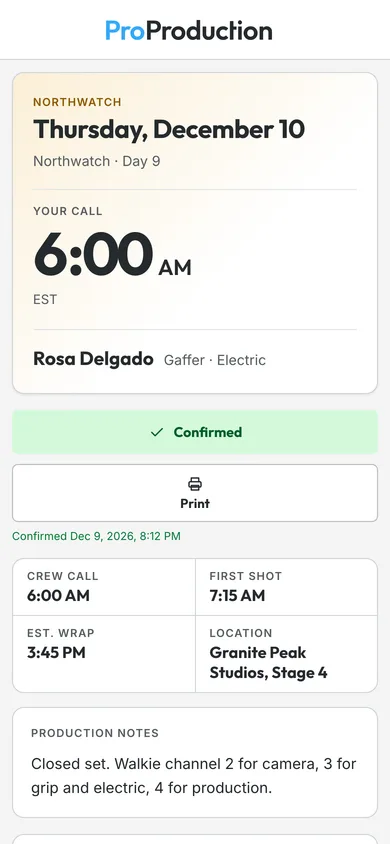
Everyone gets their own link, and on a paid plan it goes out by email too.
Schedule it for the evening before, and change or cancel it until it goes.
After a change, only the people whose sheet changed get the update.
Organizations put their logo and color on call sheets, check-in and email.
Crew scan a QR code when they get there and the board knows who’s here.
Print the check-in QR codes for the table at base camp.
Call sheets and check-in open in any phone browser.
No. Each person opens their call sheet from a link, confirms it and checks in from their phone.
Yes, from your own phone. On a phone, Text opens Messages with the person’s link filled in; on a computer, Copy text copies the message to paste into a text. Their row then shows when you texted them.
It's free for one project, from the script to the live board, and you don't need a card.